
Zebra 3 Is Out, And I Have 60 Presets In It
Zebra 3 officially launched on 20 April 2026. I’ve been part of the sound design team since June last year, after meeting the u-he crew at Superbooth in Berlin. I had my first proper look at what they were building, and walked away thinking: this is going to take people a while to understand, and then it’s going to become someone’s favourite synth of all time.
That’s roughly where I stand now, after close to ten months with it. Sixty of my presets are in the factory library. Here’s what I actually think of it.
A Quick Note on Zebra 2
If you’ve been using Zebra 2 for years, let me save you some frustration upfront: Zebra 3 is not a version bump. It’s a complete rewrite. Your Zebra 2 patches won’t load. The workflow is similar enough to feel familiar, but the architecture underneath is entirely new. Keep your Zebra 2 installation running for existing projects. They’re separate tools now.
I covered the beta in detail back in December — you can watch that here — but since then a lot has changed, and the full release is worth its own look.
The Oscillators: Photoshop for Synthesis
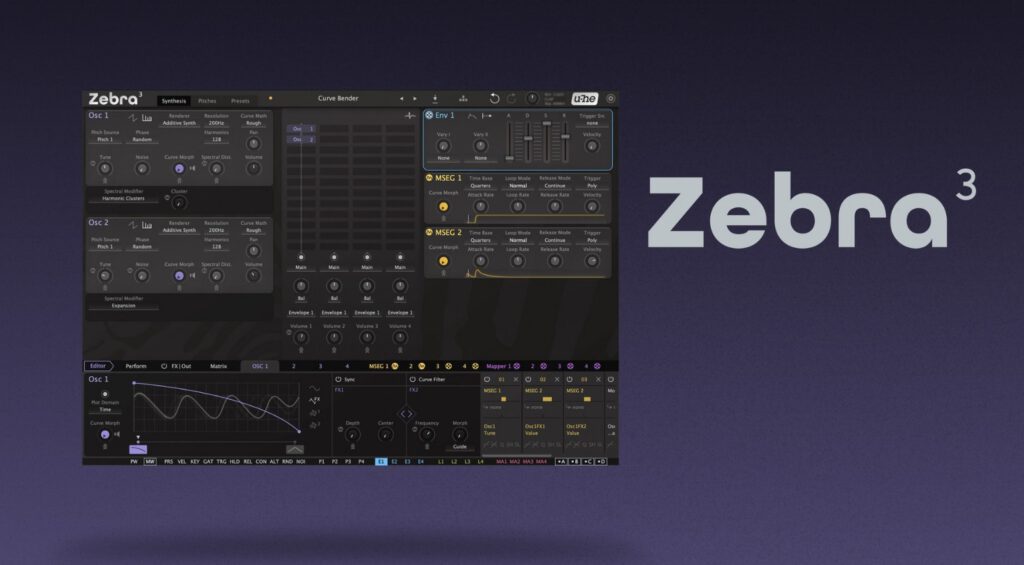
The biggest shift in Zebra 3 is the oscillator system. U-he describe it as “Photoshop for synthesis,” which sounds like marketing speak until you actually open the spline editor and start working. It’s a vector-based curve editor where you’re drawing and morphing waveforms directly, either in time domain (geometry mode) or frequency domain (curve spectrum mode). Toggle between them and you’re flipping between shaping the waveform and shaping the harmonics. It takes some adjustment to internalise, but once it clicks, it opens up ground I haven’t found in any other synth.
Each oscillator runs in one of two modes: wavetable (up to 16-voice unison, morphing between your drawn waveforms) or additive (up to 1024 partials, and yes, you can make them inharmonic). The additive mode especially is where things get strange in the best possible way. Spectral filters, spectral decay per harmonic, guide-based carving tools that let you cut specific frequency bands with surgical precision. I went deep on all of this with Zebralette 3, which is the free single-oscillator version and a very good way to understand the engine before you go near the full synth.
Physical Modelling and Texture
One of the additions I’ve spent the most time with is the physical modelling set: modal resonators, exciter modules, and expanded comb filtering. You’re not working with samples at any point. Everything is synthesised. But you can get glass bowls, wind chimes, metallic resonance, plucked strings, things that have no obvious synthetic origin. When I built the patch “Origins of the Sun” for the factory library, it was entirely modal oscillators running noise through comb filters, through the new granular texture verb. No samples anywhere in the chain. That’s a genuinely new capability for Zebra.
There’s also a granular delay, which is new to this version and sits nicely alongside the existing effects routing. The effects section has always been one of Zebra’s strengths and that continues here.
Modulation: Envelopes That Behave Like Modulars
The MSEGs have been updated to use the same spline editor as the oscillators, which means you can draw genuinely complex multi-stage envelope shapes and morph between eight of them. Crossfade morphing keeps them locked to time, which is essential for sequence-style patches. Radial morphing gives you something different: a rotating scan through the shapes.
More interesting to me is that you can now trigger envelopes from sources other than note-on. MSEGs can fire envelopes, which is how you build sequence patches without an arpeggiator. Yes, the arpeggiator is missing from 3.0. It’s coming in a later update. In the meantime, the MSEG-triggered envelope approach is genuinely expressive and more flexible in some ways than a traditional arpeggiator, though I’d still rather have both. The mapper module can also be used to control pitch sequences, so there are workarounds, but plan for this if it’s important to your workflow.
The new pitches module is one of those features that sounds minor until you use it. You can assign multiple independent pitch modules to different oscillators, set per-oscillator glide rates, and use modes like “previous source key” to create a layer that always plays the note one step behind whatever you’re triggering. I built a few patches around that, and it generates a very natural-feeling counterpoint without any external routing.
Filters and Their Trade-offs
Zebra 3 has a 2D filter palette with a lot of options: vanilla, linear, SVF, ladder, cascade, all-pass, Impossible C, Expanse. The vanilla and linear models are lightweight, the SVF is fine for most polyphonic work. The moment you start reaching for Impossible C or Expanse, you’ll notice the CPU climbing quickly. I found the all-pass filter especially interesting for leads, it adds a phase-based growl that’s different from resonance. Filter FM is available, and you can route two filters in parallel, which opens up some specific sounds around formant-style processing and split-band treatment.
Worth knowing: if you’re building dense 6-voice poly patches, stay conservative with the filter selection until you’ve benchmarked your system. This is not a light synth.
The 60 Presets
My contribution to the factory library sits across leads, basses, pads, sequences, and a few of what I’d call texture patches, the ones you probably won’t use as-is but that demonstrate what the physical modelling and granular tools can do when pushed. I leaned into the stuff that was hardest to make in Zebra 2: organic-sounding evolving textures, guttural filter-FM leads, sequence patches that use the MSEG morphing to generate movement rather than just velocity or modwheel. “Throat Funk” and “First Signs of Spring” are two I’m particularly happy with. Load them up and open the routing view, they’re decent starting points for understanding the workflow.
Is It Worth It?
Zebra 3 is €249. Zebra 2 owners who bought before November 2022 can upgrade for €30, which is an easy decision. For everyone else, it’s a full-price investment in a synth that rewards patience. There are rough edges, the missing arpeggiator being the obvious one, and the CPU demands of certain filter models mean you’ll need to be thoughtful with it. The preset library is huge at 1,200+, but like any synth at this level, the presets are a starting point, not the destination.
What Zebra 3 does that nothing else quite does: that spline-based oscillator system genuinely produces sounds I can’t replicate anywhere else. The physical modelling is properly usable in a production context. The modulation architecture is deep without being deliberately obscure. After ten months, I’m still finding new directions in it.
Grab it from u-he directly. If you want to get your head around the oscillator engine before spending any money, start with Zebralette 3, the free version, and go through the Zebralette deep-dive video first. It’ll save you a lot of confusion.
More Zebra 3 content coming, including some patch-building videos. Let me know in the comments if a full tutorial series is something you’d find useful.